Author Archives: Daniel Drake

Ethiopia’s second OLPC deployment

I’m accompanying the ecbp team as they start the 2nd OLPC Ethiopia deployment today. This time, they are working at a school in Addis Ababa. The school itself is similar to another local school that I wrote about in my first week, although smaller (approximately 1000 students, rather than 2800).

Both through mistakenly thinking this school was a public school, and also through the radiance of this photo, I was expecting the school to be more modern and have better facilities than the others I have seen. However, upon arrival I learn that this is another government school, and the facilities are strikingly bare.

As we walk into the school, the first thing that hits me is the noise of many chattering children. I ask the local team if this is their break (although I am doubting that myself, the schoolyard being mostly empty). “No, this is how they learn in class.” The teacher yells a question, and the kids all yell the answer. Or the teacher yells some kind of statement, and the kids repeat it. Over and over again. With many classes in a small area, it’s just a mess of (Amharic) sound.

Later on, I am within earshot of an English lesson. “HOW ARE YOU”, yells the teacher. The kids respond in unison, “I AM FINE THANKYOU.” This repeats indefinitely, almost army-like “SIR YES SIR” style.

The children are very friendly and flock around me, shaking my hand and asking my name. I discover that I have a supernatural ability to control their movement, simply by pointing my camera in different directions. Here is our attempt to get a photo of me with some children — you can actually see me, if you look carefully:

We spend the morning conducting questionnaires, which will generate data for evaluating the effects of the laptops (more data will be collected some time later, and data will also be collected from schools without laptops). Laptop handout starts in the afternoon. Things are nicely organised, with the kids coming up one by one, presenting signed letters from their parents, and signing for their laptops. They obey instructions to not power on the laptop until everyone in the class has signed for their XO. The teachers give out 200-300 laptops in total, with only a little assistance from ourselves.

Chaos ensues as classrooms full of children eagerly power on their laptops for the first time. The Ethiopian team explain that the children must type in their name, although some children do not seem to understand. I use my very minimal Amharic to help them out, but it’s difficult and things get harder as the other children get into Sugar and make noise as they start exploring. “Teacher, teacher” they say, pulling at my clothes. I turn to them and am greeted with “Camera, camera!” as they beg me to show them how to open Record (an instant hit).

Overall, it was a very tiring day, but a lot of fun, and rewarding to see so many happy children. Students from other classes hounded me for laptops as we left; we will return on Monday to finish the job.

Photostream updated.

OLPC Ethiopia updates

Last weekend, I wrote about Ethiopia’s first OLPC deployment. We’ve been back to the school several times since, so I have a few stories to share.

Firstly, Prof Tom Postmes and Dr Nina Hansen visited. They are starting a research project at the University of Groningen to measure the effects of the XOs on the children. On their journey to the school, they describe how they saw a child in a field, tending to his cattle. In one hand, he has a whip for controlling the animals. In the other? An XO.

Later in their journey, still before reaching the school, they find a child under a tree using his XO. Unlike all the other kids, he’s not at all excited about their presence, or them taking photos, and has no interest in seeing those photos on the camera display. He’s glued to his XO screen. They peer around to see what is draining all his attention, and they see the child looking through the Nature images bundle. This kid is fascinated by photos of the Eiffel tower, space shuttles, etc. His horizons just exploded…

The researchers were also intrigued by the way some of the children were using the Record activity. Some of these children do not have access to mirrors, and were using Record to look at themselves. Being social psychologists, Tom and Nina were excited about the changes this will have on the childrens’ self-perception and self esteem.

Back at the office, the OLPC Ethiopia team worked on creating content bundles of the regional curriculum textbooks for the school. They have acquried 39 of the textbooks (grades 2 through 8) as PDF. On Friday, we went back to the school and showed the teachers how to install them (using a customization key).

We decided to add the WikipediaEN activity along with the textbooks. In addition to a heap of textbooks, 600 kids in the middle of nowhere now have 8500 of the most popular Wikipedia articles in their hands. The children learn English from an early age, so I’m confident that it will be of use.

A journalist visited, and we took him to the school on Monday. I’ll leave it up to him to report on his findings, although I will jump in and share my favourite quote: when asked about the parents views of the laptops, the school headteacher explained how the parents view the laptops as “the rebirth of their children.”

The reborn children have not yet received any tutoring about the laptops. Although they have figured out an incredible amount for themselves, they did not seem to have figured out the collaboration features. So, we gathered 15 or so children in a classroom, and showed them how to set up shared Chat, Distance and Write activities over the mesh. They were ecstatic. We told them to tell all their friends, and then we returned to Addis with high spirits.

Plans with other schools are progressing. The Ethiopian way of life is simply less organised than what I’m used to. It’s normal here for people to turn back on their plans, multiple times. Assuming plans stick (hah), I should get to see at least one more deployment.

Ethiopia’s first OLPC deployment

This week, I accompanied the OLPC Ethiopia team on their travels to a rural school in the Oromia region. The 2 hour drive was fascinating. You start off driving through typical Addis city areas, but slowly there are more and more animals on the road. People are jogging behind their donkeys, which are being used to transport wood and other materials. The landscape improves. After more and more animal-dodging, we reach a town with some basic shops, and the road becomes a dirt track. Oh good, we’ve arrived.

Not.

The journey continues. Houses turn into shacks and then into mud huts. Fewer and fewer people are around, and the countryside gets richer and richer. Never again am I complaining about bumpy roads in the UK/US. On every step of the journey, I’m thinking “there’s no way we’re sending laptops here!”

30 minutes later, we veer off road and start driving up a grassy bank. We stop at a gap in a fence. Welcome to Mulosayoo school.

The school is made up of a number of disconnected buildings, each one holding one or two classrooms. The playground/assembly area is just some grass. Cows are calmly wandering around (unfortunately we did not budget any laptops for them though). The children are fascinated by my presence, seemingly having never seen a white person before. One of the first things that strikes me about the classrooms is that they do not even have lights!

The teachers are excited but having little experience with computers, they are challenged by the training. Perhaps one of the most encouraging stories from the training days came from a daughter of one of the teachers. The teachers had been in possession of the laptops for a while beforehand, and this young girl had spent some time with it. She eagerly explained how she had learned to write, paint, and take photos, without any introduction or training whatsoever.

There was much excitement as laptops were distributed.

My favourite moment of the experience was driving back on the 3rd day. Shortly after leaving we drove past children walking home with their laptops. We then reached a scene where there was a rural-looking man on horseback, dressed in simple, rag-like clothing. Remember, we’re totally in the middle of nowhere. 3 children were following on foot, holding their high-tech XO laptops. This was easily the biggest mix of generations, lifestyle and technology that I have ever seen in a single scene. No photo, unfortunately, so it will just remain as a memory.

More pics on the OLPC photostream.

Addis Ababa, week 1

I’ve completed my first week in Ethiopia. I’ve spent most of the time working with the ecbp team behind the project. This week, we have been preparing laptops for distribution and have completed the first round of teacher training at a local school.

It is difficult to appreciate just how simple this school is. The classrooms are bare, with nothing more than desks, chairs, a blackboard and sometimes a sink. It will be an interesting contrast to see children using high-tech XO laptops in this environment.

I never know what to comment on when people ask for my opinion on the area. My hotel is in a newer part of town, on a busy road. Blue-and-white taxi buses fly past, breaking every rule of the roads that I’m used to, with someone hanging out of the window shouting out the destination. Many vehicles are old and the petrol fumes are a little unpleasant, and combined with the light air at this altitude it is hard to get used to breathing while on the road-side. Ethiopian children swarm around you, trying to sell chewing gum and clean your shoes. The local food is nice, and extremely cheap, but a bit too much of the same to have all the time.

There is more industry here than you might expect, but I think it is heavily propped up by foreign aid. During a conversation with a local about the country in general, he made the amusing remark that he views Ethiopians as less applied than people in the west because Ethiopians are generally lazy and get nice weather all the time!

Amharic is an interesting language. Thanks to a patient coworker, I’ve picked up some basic phrases, can count to 39, and have acquired some basic understanding of the Ge’ez alphabet. Vowels only exist as suffixes to consonants, so there is a nice mapping from written form to pronounciation. Other interesting differences include the calendar (it’s new year 2001 in Ethiopia, and there are 13 months in a year), and the time system (00:00 is sunrise, not midnight). Sometimes I don’t know whether to believe the people who tell me this!

After spending almost all of my time working this week, I ventured out today and saw some more of the city. It was interesting to see the older districts, more typical of the area. I confronted my fear of the aforementioned taxis (assisted by a friend!) and practiced my minimal Amharic.

On Monday, I will visit a school a little out of town. I’ll be observing the teacher training, then I’ll assist with Wednesday’s deployment of 650 laptops to the students.

All aboard!


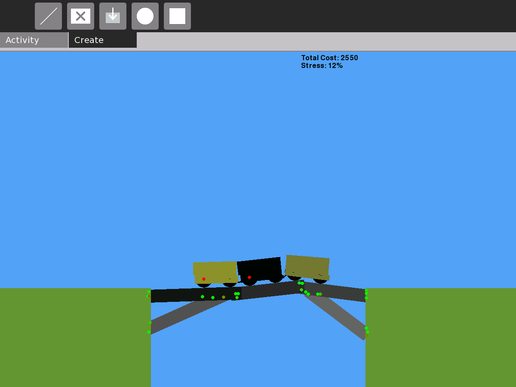
I spent some time this weekend at the OLPC Physics Game Jam. I teamed up with the legendary Nirav Patel and we made a bridge building game. The objective is to build a bridge and see if it survives after a train starts travelling across it.

We only have one level so far, but it is quite engaging and not as easy as it might sound. It was interesting to see some youngsters try it and experiment with different bridge structures during the review session. The game also features some top notch sound effects coordinated by Brian Jordan.

We won the gold prize for game development. To learn more and download it, see the Bridge page on the wiki.

Attention: activity developers

Seth Woodworth, a nocturnal intern who works and sleeps on the other half of my desk, recently installed Google Analytics on the OLPC wiki. He has found some fascinating results.

The most amazing figure is the amount of traffic that comes from Uruguay, a country where we have now delivered 100,000 XO laptops (a recent milestone which hit national media in UY in a big way). Approximately 60% of the wiki traffic originates from Uruguay, 10,000+ visits per day, almost all of which is going to the Activities page. A contact at LATU has confirmed that these visits are actually children downloading activities and spreading the word, not a script or something.

This is huge. Loads of Uruguayan children are discovering the huge range of available activities and experimenting with them, every single day. If you’ve written an activity and listed it on that page, it is almost guaranteed that a lot of children have tried it.

The official language of Uruguay is Spanish (and the same is true for many of our other deployments), so ensuring your Spanish translations are up-to-date is of huge value here.

See the end of the latest community news for more of our findings.

Birthday

I’m 22 today. Celebrating tonight with a few friends.

My internship at OLPC continues to be very enjoyable; we’re making inroads all over the world, and we’re working on communicating our successes more effectively. Big things are happening. My internship ends in a month’s time, and I’ll be leaving the US soon after.

I’m applying for a business/management masters to continue my studies in September 2009. This leaves a gap of 11 months to fill. I’m working on finding opportunities to spend that time assisting OLPC deployments around the world.

All that plus a small business venture is keeping me very busy.

Followup notes on XO alternate desktops

Some followup notes from our alternate Linux desktop on XO work:

  • The README included with the script provides some more specific instructions.
  • Your SD card needs to be a minimum of 4GB capacity, because these distributions install more than 2GB by default. We could probably find some smaller distributions, although we require some relatively recent components for some part of the system (e.g. X), so finding a distribution that is both modern and small might be a challenge.
  • There are ongoing efforts to create a significantly smaller distro to run on the internal flash, but that is an early project at the moment.
  • We heavily recommend using a SD card that is advertised as fast, extreme, ultimate, or whatever! I was previously sceptical of cards advertised in this way – are they actually significantly faster? The answer is YES – we have a ‘non-extreme’ Kingston card and it is so much slower than the others. Installation took 4 times as long. I’m not sure a good way of benchmarking these, the standard “hdparm -t” test showed similar figures on both slow and fast cards.
  • I’ve spent most of my time with Fedora. On the whole, it works very well for a machine that is understandably lower spec than most. I do recommend slimming down the services though – turn off all the NFS daemons, cups, bluetooth daemon, pcscd, kerneloops, … In fedora this is done with the ‘service’ command for a one-time stop, and ‘chkconfig’ to prevent things starting at boot.
  • When you run a lot of big applications, the machine does really slow down. Sometimes the mouse cursor freezes for a while. Perhaps we should experiment with swap space, currently I have none.
  • Sound does not work. In Fedora, it doesn’t work at all, probably a PulseAudio bug. I’m hoping that applying the system updates will fix this, but the Fedora infrastructure is down at the moment. In Ubuntu, sound works at the login screen (you hear the welcome sound) but not after you login.
  • On the postive side: wireless works, suspend works (most of the time), mouse and keyboard are good, gnome-power-manager dims the screen when idle, etc. It really acts as a normal fully usable distro with a few quirks identified above.

Regular Linux desktops on the XO

Me and Bobby Powers have spent a few hours smoothing out the process of getting fully-featured Linux desktops to boot on the XO laptop. On the whole, OLPC developers have been pretty good at getting code upstream, so only a few fixups are needed to get things operational on the XO.

The only caveat is that you need a 4GB (or larger) SD card. The XO itself only has 1GB of storage, which is not big enough for the standard installs of the distributions that we’ve been playing with.

We’ve got Fedora 9 and Ubuntu Intrepid Alpha 3 working. Here is the process, using Fedora 9 as an example:

First, download the regular CD/DVD installation media for your distribution. For Fedora 9, you go to http://fedoraproject.org/en/get-fedora. Burn that to CD/DVD.

Next, find a regular PC that is capable of reading SD cards. We’re using a standard desktop plus a USB card reader. Boot that PC from the CD/DVD installation media that you burned earlier. Proceed through the installation as usual, but when asked where you would like to install the operating system, select the SD card.

Choose to setup the disk partitions manually. Do not do any fancy partitioning, just choose one partition that fills up the card. You don’t need to add any swap space.

Select the ext3 filesystem and choose to not install a bootloader.

Wait for installation to complete, and shut down the system.

Next, you need a PC running Linux. This can be the same PC as the one you used to install onto SD, assuming that one has Linux installed on it’s hard disk too. It doesn’t really matter which distribution, as long as you have git and regular development tools installed, and the SD card mounted at a known location.

On this PC, run the following:

# git clone git://dev.laptop.org/users/dsd/XO-alt-distro

Next, become root and run the script.

# sudo su -
# cd ~dsd/XO-alt-distro
# ./sd_fixup fedora-9 /media/disk

It will now download and compile the OLPC kernel, and perform a few other necessary tweaks to your SD card.

When the script has completed, unmount the SD card and plug it into an XO. Boot the XO, and say hello to your fully-functional Linux desktop.

In future, we plan to publish filesystem images of SD-installed distributions, so that you can avoid much of the above. To simplify further, we could also write a tool which runs on the XO which downloads said filesystem image and flashes onto SD.

Update 19/08/2008: Posted some additional notes

Fedora/RPM packaging

Since starting at One Laptop per Child I have been doing some distro work on the OS platform for the XO laptop. The platform is based on Fedora 7 and I have been working on rebasing us onto Fedora 9 for the next release.

Having very little distribution experience outside of developing Gentoo for the last few years, I’ve found some aspects of Fedora’s binary package (RPM) workflow particularly interesting:

  1. Automatically detected dependencies: In Gentoo ebuilds, we have to state that package A depends on library B. In Fedora, when building the binary package, the build tools determine many runtime dependencies automatically so there is no need for developers to manually list all dependencies in spec files.
  2. Chroot build environments: All packages are built in an otherwise-empty chroot. The build system creates a chroot, quickly installs all of the base binary packages and the build dependencies, then builds/installs a package, produces a package, and throws the chroot away. This allows for predictable build environments and is good for QA.
  3. Community access to the build box: All packages are built by Koji. Koji has a nice “scratch-build” system where you can throw a source RPM at it, and it will build it and serve it back to you on a webpage a few minutes later. Great for build testing and handy if you don’t have a complete build environment locally. The scratch-build service is open to non-developers assuming they have been through the click-through contributor agreement.
  4. Subpackages: It’s pretty neat how one spec file (equivalent to an ebuild in some ways – textual build scripts) can actually produce several packages. Your spec file takes one upstream tarball, unpacks/compiles/installs it, and then specifies which of the installed files belong to which subpackage.

Naturally, there are some drawbacks too:

  1. Build dependencies: Even though many runtime dependencies are automatically detected, you still need to specify the components required for compilation. Remember, each package is built in a clean chroot. You end up having to specify most of the dependencies anyway (although it is still convenient in that you do not have to specify which subpackage has which dependencies – that is determined automatically).
  2. No build customisation: OLPC have to fork a few packages which have wacky dependency chains, just to disable support for a certain feature or whatever. Forking away from upstream is undesirable but sometimes necessary. For example, we had to disable libgnome support in GNOME’s Python bindings to avoid libgnome being pulled into the build. libgnome was pulling in the following packages: audiofile bluecurve-icon-theme control-center-filesystem esound-libs fedora-gnome-theme fedora-icon-theme fedora-logos gail gnome-icon-theme gnome-keyring gnome-themes gtk-nodoka-engine libart_lgpl libbonoboui libgnomecanvas libgnomeui libutempter metacity nodoka-metacity-theme pyorbit. Ouch.
  3. Convolution/confusion of build tools: To build a package, you can use rpmbuild to do it on your live system, or you can use mock to do the clean chroot thing I described above. Or you can use koji’s command-line client to upload it to koji. Not everything can be done through koji/mock, e.g. you still need to use rpmbuild to build OLPC’s kernel. Also, rpmbuild is the only tool that can build a source RPM, I think.

I’ve also been impressed by the Fedora development community. The community recently made the realisation that OLPC is Fedora’s biggest deployment (over 400,000 XO laptops worldwide, 55,000 more built and distributed each month, 100% of them running Fedora). Greg Dekoenigsberg recently announced the Fedora OLPC special interest group which sounds promising.