Author Archives: Daniel Drake

Breaking encryption the easy way

Yesterday, I successfully obtained images my Microsoft fingerprint reader. After cleaning up the driver a little, I decided to try my other device.

A little background:

There are 3 ranges of devices which we believe are all very similar:

  1. Digital Persona UareU 4000
  2. Digital Persona UareU 4000B
  3. Microsoft fingerprint reader (and products containing them)

The 4000B is basically a USB2 version of the 4000, and we think the Microsoft devices include ‘repackaged’ 4000B devices. My driver will hopefully support all 3. I own #1 and #3 and have sniffed logs from all 3 device types in my posession.

I plugged in my UareU 4000, and it sprang into life with my driver. I scanned a fingerprint and it gave me this:

Hmm. The data is very jumbled and is probably encrypted. I checked my logs, and sure enough – the data that comes from the 4000 and 4000B devices is jumbled and doesn’t show the same neat structure in comparison to the MS device.

A while ago, I had compared the 4000B firmware with the firmware for the MS devices. There is just one single bit difference between the two, suggesting that the devices are actually identical, yet the 4000B is sending encrypted data and the MS device is not?

I uploaded the 4000B firmware to my MS device, and sure enough, it then started sending encrypted images too. In other words, we have found the single bit in the firmware which turns encryption on and off.

This still leaves the problem that my 4000 device is still sending encrypted images. The firmware is quite different from the 4000B, but by looking at patterns in the byte data, I made an educated guess where the “encryption bit” would be in the UareU 4000 firmware. I uploaded the modified version to my device, and sure enough, it now sends unencrypted images.

I’m glad it turned out to be so easy.

Fingerprinting

Over the last couple of days, I found the time to finish off the dpfp kernel-side driver so that it exports fingerprint data into userspace, to make it easier to investigate the image format.

I had it working relatively easily. Running a small program on /dev/dpfp0 produces 7 data files, one of which is the fingerprint data, the others are interrupt data and other blocks of data that are probably interesting but we don’t know the purpose of.

I was going to leave it at that (others seem to be very interested in the image format), but I thought I might as well have a quick look at the fingerprint data and see if I can find anything interesting. I had glanced at some data previously, but had not done anything with my findings – it’s awkward to work with until you reach the stage where you can obtain data with just a single command.

I noticed the strange structure that I saw before: the data appears to be separated into chunks, each chunk being separated by 26 zero bytes. Each chunk is about 358 bytes long, so I decided that one chunk may be equivalent to one row of pixels in an image.

I noticed that the final part of the transfer ends right in the middle of the zeroes. I also noticed that the number of zeroes between chunks varies a little here and there.

Unusual, but not totally out of the question. Maybe each chunk starts and ends with zeroes, which would mean each chunk starts halfway through these series of zeroes I was seeing. That would explain why the transfer ends halfway through a block of zeroes.

Picturing that in an image scenario (where 0 = black), I realised that this would result in two black columns down the left and right side of the image. I then recalled an image that Jose M Robles sent me recently: a raw image from a fingerprint scanner (not really sure which one) which had black columns down either side. Jose has been doing a fantastic job throwing around theories about the image format, sending me histograms, pixel averages, sample images like that one, etc. Jose’s experiments also seemed to indicate that the encryption was weak, and at this point, things were starting to fall together.

After a few more calculations I decided that the image data starts after a 64-byte header. I also deduced the width (358 + 26 zeroes = 384 pixels) and height (exactly 259 ‘rows’ of pixels are included in the transfer). I cut out the header and replaced it with a PGM header.

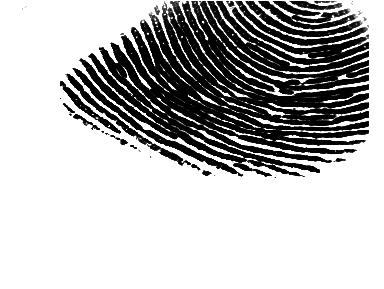
I was both happy and amazed to see the result:

No encryption whatsoever, despite DigitalPersona’s claims (PDF).
Update: Those claims may be true. The UareU 4000 isn’t advertised to be included in the MS devices, we just put 2 and 2 together and saw all the simlarities. Now that I have looked closer at the UareU 4000 behaviour, it looks like encryption may be in place on those devices (but not the MS ones).
Another update: I discovered that the devices do support encryption but the Microsoft devices ship with encryption turned off.

This isn’t a real fingerprint scan – I actually scanned one of my toes, to protect the identity of my innocent fingers. Proper scans look more fingerprint-like.

3 imagemagick commands later (invert colours, increase brightness, decrease gamma) and it is perfect for processing:

Fancy stuff. It is lucky that those solid black columns are there, otherwise this wouldn’t have been anything like as obvious. I’ll be rewriting the driver soon, to be more simplistic and to export PGM images straight from the /dev node.

Using git-bisect to find buggy kernel patches

A keen Gentoo user (Ronald) recently came onto IRC, with a strange kernel problem: 2.6.15 only using one of his CPU’s although it sees both, 2.6.14 works fine.

He was keen to investigate the problem himself so I thought now would be a good time to try the git bisect feature for the first time. There were approximately 5500 patches merged between 2.6.14 and 2.6.15, and this method found the offending patch in only 13 reboots (OK – still a high number, I said this guy was keen though!).

This feature is very effective and very easy to use, so I’m going to demonstrate it here. Linus also wrote a nice HOWTO on the topic.

You first have to clone the Linux kernel git repository. This is the same concept checking out a repository from CVS.

# git clone git://git.kernel.org/pub/scm/linux/kernel/git/torvalds/linux-2.6.git linux-git
# cd linux-git

This directory looks like an ordinary kernel source distribution as you might expect in /usr/src/linux. It also has a hidden .git subdirectory which is where git stores its magical data. Tell git that we want to find a buggy patch through bisection:

# git bisect start

Next, tell git which kernel was the last known-working kernel, and which kernel is known to be not working. To identify these kernels, you can either use the long hexadecimal commit numbers, or you can abbreviate those numbers, or you can refer to tags directly. Linus tags every release with the version number, so the next step is as simple as:

# git bisect bad v2.6.15
# git bisect good v2.6.14

git now runs off and locates the commit exactly halfway between 2.6.14 and 2.6.15. It then “checks out” this tree, so the kernel infront of you is effectively a snapshot from halfway inbetween 2.6.14 and 2.6.15.

Bisecting: 2705 revisions left to test after this
[dd0314f7bb407bc4bdb3ea769b9c8a3a5d39ffd7] fbcon: Initialize new driver when old driver is released

Build that kernel in the normal way, and reboot into it. It works, so we know the bug was introduced after this point. We inform git of this:

# git bisect good

git now discards the whole first half of commits between 2.6.14 and 2.6.15 and bisects the remaining half (the changes after the point we just tested, but before 2.6.15). This is just a simple binary search. git now presents us with a new kernel snapshot (in this case, 3 quarters of the way between 2.6.14 and 2.6.15) and we have to test this.

A couple of kernels later, the search gives us a kernel which exhibits the bug. Telling git about this isn’t any harder:

# git bisect bad

The search continues, with the user telling git if the kernel was “good” or “bad” each time, and several reboots later we end up with the exact patch that introduced the bug:

# git bisect bad
cd8e2b48daee891011a4f21e2c62b210d24dcc9e is first bad commit
diff-tree cd8e2b48daee891011a4f21e2c62b210d24dcc9e (from d2149b542382bfc206cb28485108f6470c979566)
Author: Venkatesh Pallipadi <venkatesh .pallipadi@intel.com>
Date:   Fri Oct 21 19:22:00 2005 -0400
    [ACPI] fix 2.6.13 boot hang regression on HT box w/ broken BIOS

Ronald filed kernel bug 5930 about this. Usually this stuff is a nightmare to debug, and even though this did require many reboots to locate, it’s definately a step in the right direction. The number of bisections you need to do is obviously less if you have a smaller range to test (e.g. if he’d known that 2.6.15-rc1 was OK and 2.6.15-rc4 was bad, some time would have been saved).

Alauda driver merged

Just a quick entry to point out that my Alauda driver project (a driver for certain XD and SmartMedia card readers) has been merged upstream into Linux 2.6.16-rc1, and will be included and supported in all future releases. That’s one driver out of the way!

Digital Persona Fingerprint driver site launched

I’ve been receiving plenty of emails about the dpfp driver, so I set up a site and mailing list where interested people can keep track of things.

I’ve also recieved a donation of two Digital Persona fingerprint scanners from Gerrie Mansur of Security Database B.V. My keyboard was originally donated by Tony Vroon from Gentoo. Thanks!

I just sent a Status update to the list to get things going. Things are progressing nicely, it won’t be long before we can easily dump fingerprint data to userspace and start a big investigation into the image format.

Digital persona fingerprint driver progress

Quick update on the dpfp project:

I recently upgraded to amd64, and running my existing code caused an instant kernel panic on plugin to my new system. Fixing that problem sprung the device into action – I now get the expected responses, where I was just getting silence before. Looks like my x86 was hiding the stupid bug in the early versions of my driver.

After working through the rest of the intitialization routine, I now have a driver which gets as far as turning on the light which illuminates your finger when you put it on the sensor, and my driver receives an interrupt when you put your finger there.

I’m beginning to think that my earlier assumptions about the sensor in my keyboard being identical to the sensor in the digitalPersona UareU 4000 product may be wrong. Unlike my keyboard, the UareU 4000 does not have an endpoint (a USB channel) where firmware can be uploaded. If the 4000 is not firmware-based, and my keyboard sensor is, then that suggests a fairly significant difference between the two devices.

Update: This statement is wrong. Indeed, the UareU does not have a bulk-out endpoint for uploading firmware, but the same is true for my Microsoft device. Firmware is uploaded over the control endpoint (a 2-way channel present on most USB devices designed for simple request/response commands) which is slightly stupid, but hey. I have also analyzed the UareU protocol now, and I can now accurately say that these devices are almost identical. My driver will support both product ranges. More on this soon.

digitalPersona are very keen to claim that the devices are different, but they only discuss differences in the available software, so I’m not entirely convinced by that alone.

I’m still not sure how to interpret the mass of data recieved from the device when a finger is placed on the sensor. I’ll be publishing a breakdown of what I do know soon, in hope that other people will be able to lend suggestions or other contributions into solving this problem.

Driver source can be found here: http://dev.gentoo.org/~dsd/dpfp/

As a sidenote, I’ve also been hacking on zd1211 devices, stay tuned for more info on that…

sit down

Chris, a good friend from back home, recently gave in to peer pressure and started a weblog. He is studying some form of art and was unlucky enough to end up somewhere in Wales where they have not yet invented residential internet services, but his work looks pretty damn cool!

Recent hacking on VIA 82Cxxx IDE driver

I’ve recently been doing some hacking on the Linux VIA IDE driver. The driver now supports multiple controllers on the same system (if such a situation could ever exist) and support has been added for the VT6410 and VT8251 chipsets.

All of this is included in Linux 2.6.15.

A side effect of this work is that we had to drop the /proc/ide/via file, a dynamic text file which provided some advanced information and stats about the VIA IDE hardware present on the system, and the attached disks. This kind of querying should be done in userspace anyway, so I have produced viaideinfo to do the same thing. viaideinfo has been tested by quite a few people and is now at version 0.3. It is in portage as sys-block/viaideinfo.

Beagle 0.1.2

Beagle 0.1.2 was released on Friday and has just been added to Portage.

Highlights this time around include a fair reduction in memory consumption, various fixes and optimizations, and the ability to search for matches in a certain date range.

We now require Mono 1.1.10, so the issue where the mono-beagled process would hang at random times is gone.

Users of the firefox plugin will should reinstall the plugin, as it has been improved to use vastly fewer resources (we don’t start a new process every time you visit a webpage any more!).

Unfortunately indexing of word-files has been temporarily dropped in the Gentoo package, until gsf-sharp gets added to portage. This will hopefully happen soon.

For more info, see the release notes.

Booting Linux userland from an External USB Flash Disk

For a long time, it’s been possible to boot Linux from an external drive such as USB flash, without requiring an initrd (initial ramdisk). You can do this with the “root=/dev/sda1” kernel parameter, where sda1 is the partition on the USB flash device containing your userspace (may vary depending on your partitioning setup and if you have SCSI or SATA devices).

(Whether or not your BIOS can boot from USB or if you have to store the bootloader and kernel on a more common boot medium is another story)

As of Linux 2.6.10, the USB flash storage initialization changed, and a side effect of this made it no longer possible to boot Linux from USB flash like this. The change meant that, in situations like this, the kernel would try to mount the root filesystem (on the USB flash disk) before the usb-storage driver was fully initialized.

Users saw errors on bootup along the lines of:

VFS: Cannot open root device 'sda1' or unknown-block(8,1)
Please append a correct 'root=' boot option
Kernel panic - not syncing: VFS: Unable to mount root fs on unknown-block(8,1)

Reverting this change was not an option (it was justified) so we had to find an alternative way to solve this problem.

After a few discussions, we decided that at this point in time there was no safe and elegant solution to the problem, so we had to go for a more simplistic approach. I wrote a patch which was accepted into Linux 2.6.11.

My patch added a rootdelay kernel parameter, which allows the user to specify a delay (in seconds) that the kernel should wait before trying to mount the root device. Since the kernel performs tasks in parallel, the usb-storage driver will continue initializing while the block layer is waiting for the specified delay, thus correcting the sequence of events.

So, to overcome this problem, you might use a grub configuration section such as:

title=My kernel which boots userland from a USB flash disk
root (hd0,0)
kernel /bzImage-2.6.14 root=/dev/sda1 rootdelay=10

Most users will be able to get away with a shorter delay (try 5 seconds), but some flash devices will require a longer delay.

This is a relatively minor feature, the change occurred a fair while ago, and the parameter is documented in Documentation/kernel-parameters.txt, but I’m still seeing a fair few people running into this problem. Hopefully this post will make the solution easier to find, until a more transparent solution is developed.