Over the last couple of days, I found the time to finish off the dpfp kernel-side driver so that it exports fingerprint data into userspace, to make it easier to investigate the image format.
I had it working relatively easily. Running a small program on /dev/dpfp0 produces 7 data files, one of which is the fingerprint data, the others are interrupt data and other blocks of data that are probably interesting but we don’t know the purpose of.
I was going to leave it at that (others seem to be very interested in the image format), but I thought I might as well have a quick look at the fingerprint data and see if I can find anything interesting. I had glanced at some data previously, but had not done anything with my findings – it’s awkward to work with until you reach the stage where you can obtain data with just a single command.
I noticed the strange structure that I saw before: the data appears to be separated into chunks, each chunk being separated by 26 zero bytes. Each chunk is about 358 bytes long, so I decided that one chunk may be equivalent to one row of pixels in an image.
I noticed that the final part of the transfer ends right in the middle of the zeroes. I also noticed that the number of zeroes between chunks varies a little here and there.
Unusual, but not totally out of the question. Maybe each chunk starts and ends with zeroes, which would mean each chunk starts halfway through these series of zeroes I was seeing. That would explain why the transfer ends halfway through a block of zeroes.
Picturing that in an image scenario (where 0 = black), I realised that this would result in two black columns down the left and right side of the image. I then recalled an image that Jose M Robles sent me recently: a raw image from a fingerprint scanner (not really sure which one) which had black columns down either side. Jose has been doing a fantastic job throwing around theories about the image format, sending me histograms, pixel averages, sample images like that one, etc. Jose’s experiments also seemed to indicate that the encryption was weak, and at this point, things were starting to fall together.
After a few more calculations I decided that the image data starts after a 64-byte header. I also deduced the width (358 + 26 zeroes = 384 pixels) and height (exactly 259 ‘rows’ of pixels are included in the transfer). I cut out the header and replaced it with a PGM header.
I was both happy and amazed to see the result:

No encryption whatsoever, despite DigitalPersona’s claims (PDF).
Update: Those claims may be true. The UareU 4000 isn’t advertised to be included in the MS devices, we just put 2 and 2 together and saw all the simlarities. Now that I have looked closer at the UareU 4000 behaviour, it looks like encryption may be in place on those devices (but not the MS ones).
Another update: I discovered that the devices do support encryption but the Microsoft devices ship with encryption turned off.
This isn’t a real fingerprint scan – I actually scanned one of my toes, to protect the identity of my innocent fingers. Proper scans look more fingerprint-like.
3 imagemagick commands later (invert colours, increase brightness, decrease gamma) and it is perfect for processing:
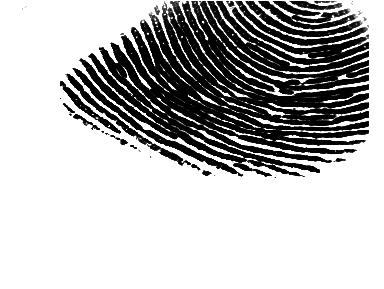
Fancy stuff. It is lucky that those solid black columns are there, otherwise this wouldn’t have been anything like as obvious. I’ll be rewriting the driver soon, to be more simplistic and to export PGM images straight from the /dev node.
